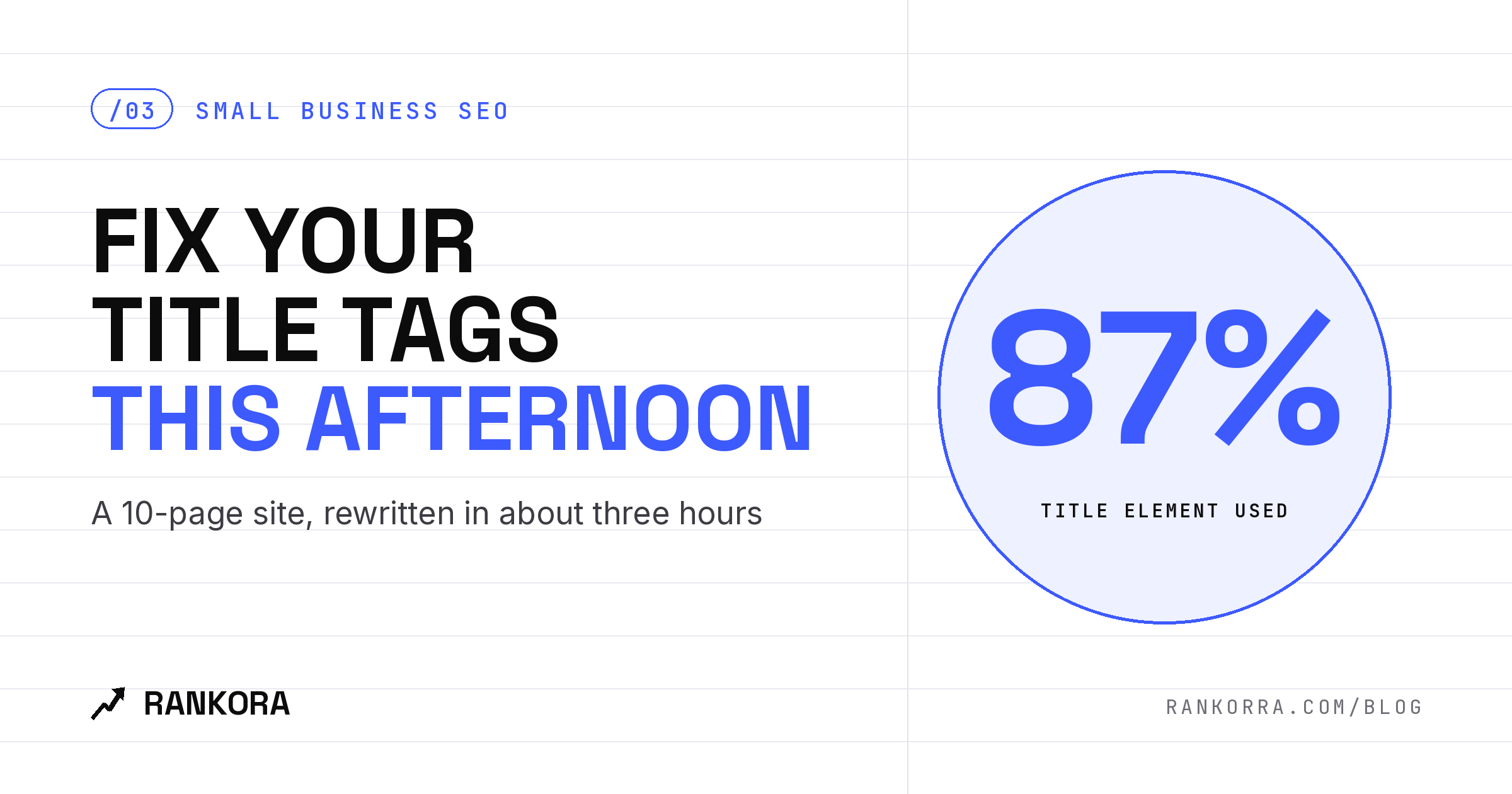
Title tags for small business sites come down to one rule: give every page a unique, plain description of what it offers, usually the service, the place and your name. Google says it uses the HTML title element for title links around 87% of the time, so on a 10-page site you can rewrite every title in one afternoon and control most of what searchers see.
The title tag is the line of HTML inside <title> that Google usually turns into the blue clickable headline in search results. Google calls that headline a title link. Its SEO Starter Guide says title links can "help people decide which search result to click," and that a good title is "unique to the page, clear and concise, and accurately describes the contents of the page."
Most small business sites miss that bar in the same ways: a homepage titled "Home," five service pages sharing one title, a theme default nobody changed. None of this needs a developer or a budget. It needs a list, a formula and about three hours.
How does Google decide what title to show?
Google writes the title link itself, and your title tag is its first choice, not its only one. The title link documentation lists nine sources, including the <title> element, the main visible heading, <h1> elements, og:title tags, anchor text on the page and text in links pointing to the page.
In practice the title element wins most of the time. In a September 2021 Search Central post, Google said title elements were "now used around 87% of the time, rather than around 80% before." That is the latest figure Google has published.
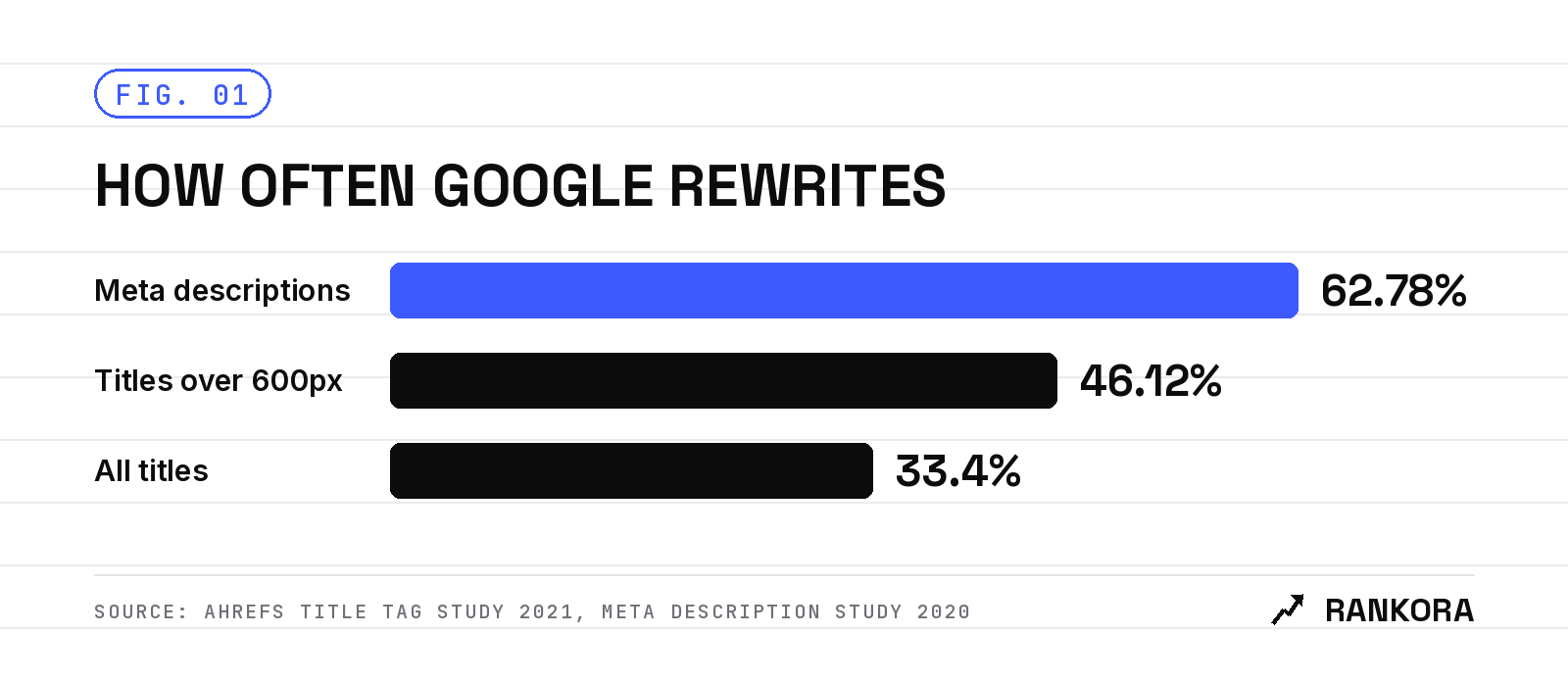
Third-party data points the same way. Ahrefs studied 953,276 top-10 pages in November 2021 and found Google rewrote the title 33.4% of the time. When it did, it pulled the replacement from the H1 in 50.76% of cases. Titles wider than 600 pixels were rewritten 46.12% of the time. Treat that as one vendor's snapshot from 2021, but the lesson holds: short, accurate titles that match the H1 tend to survive.
Step 1: List every page and its current title tag
You can't fix titles you haven't read. On a 10-page site, open each page, right-click, choose View Page Source and search for <title>. Paste the URL and the current title into a two-column sheet.
Then add a third column for what Google actually shows. Search site:yourdomain.com and compare. Any row where the shown headline differs from your title tag is a page where Google decided your title wasn't good enough. Those go first.
Step 2: Pick one search phrase per page
A title can only describe one thing well, so decide what each page is for before you write. Open the Performance report in Search Console, click a page and look at the Queries tab: those are the phrases Google already associates with it. Pick the one that best matches the page and has real impressions.
If a page has no data yet, check what people actually type. Our guide to matching a page to search intent covers how to read a results page before you commit. For a ranked shortlist of phrases your site can realistically win, Rankora's keyword research tool scores keywords against your domain's current authority instead of raw volume.
One phrase per page also stops two pages fighting over the same search. If your "Services" page and your "Physiotherapy" page both target "physiotherapy in Indore," merge the intent or split the phrases.
Step 3: Write each title with one formula
For service businesses, this pattern works on almost every page: what you offer, where, and who you are. Google's docs say to put the site name "at the start or end" with a delimiter. For a business nobody searches by name yet, put it at the end, because the service is what the searcher is scanning for.
Here is a hypothetical 10-page site for an invented physiotherapy clinic in Indore, before and after:
| Page | Before | After |
|---|---|---|
| Home | Home | Physiotherapy Clinic in Vijay Nagar, Indore | Kriya Physio |
| Back pain | Services | Kriya Physio | Back Pain Physiotherapy in Indore | Kriya Physio |
| Sports injury | Services | Kriya Physio | Sports Injury Rehab in Indore | Kriya Physio |
| Home visits | | Kriya Physio | Physiotherapy Home Visits in Indore | Kriya Physio |
| Pricing | Untitled | Physiotherapy Session Fees | Kriya Physio |
| Contact | Contact Us Contact Kriya Physio Indore Physio | Contact and Directions | Kriya Physio, Indore |
Three rules keep the formula honest:
- Use the words on the page. If the page says "sports injury rehab," the title says it too.
- Add the city only where location matters. Service and contact pages, yes. A blog post on stretching, usually no.
- Aim for about 50 to 60 characters. Google gives no character limit; it truncates titles "to fit the device width." Ahrefs' 600-pixel finding is why 60 characters is a sensible ceiling.
Step 4: Remove the five patterns Google rewrites
Google's title link documentation names the exact problems that trigger a rewrite, with its own examples. Check every row of your sheet against them.
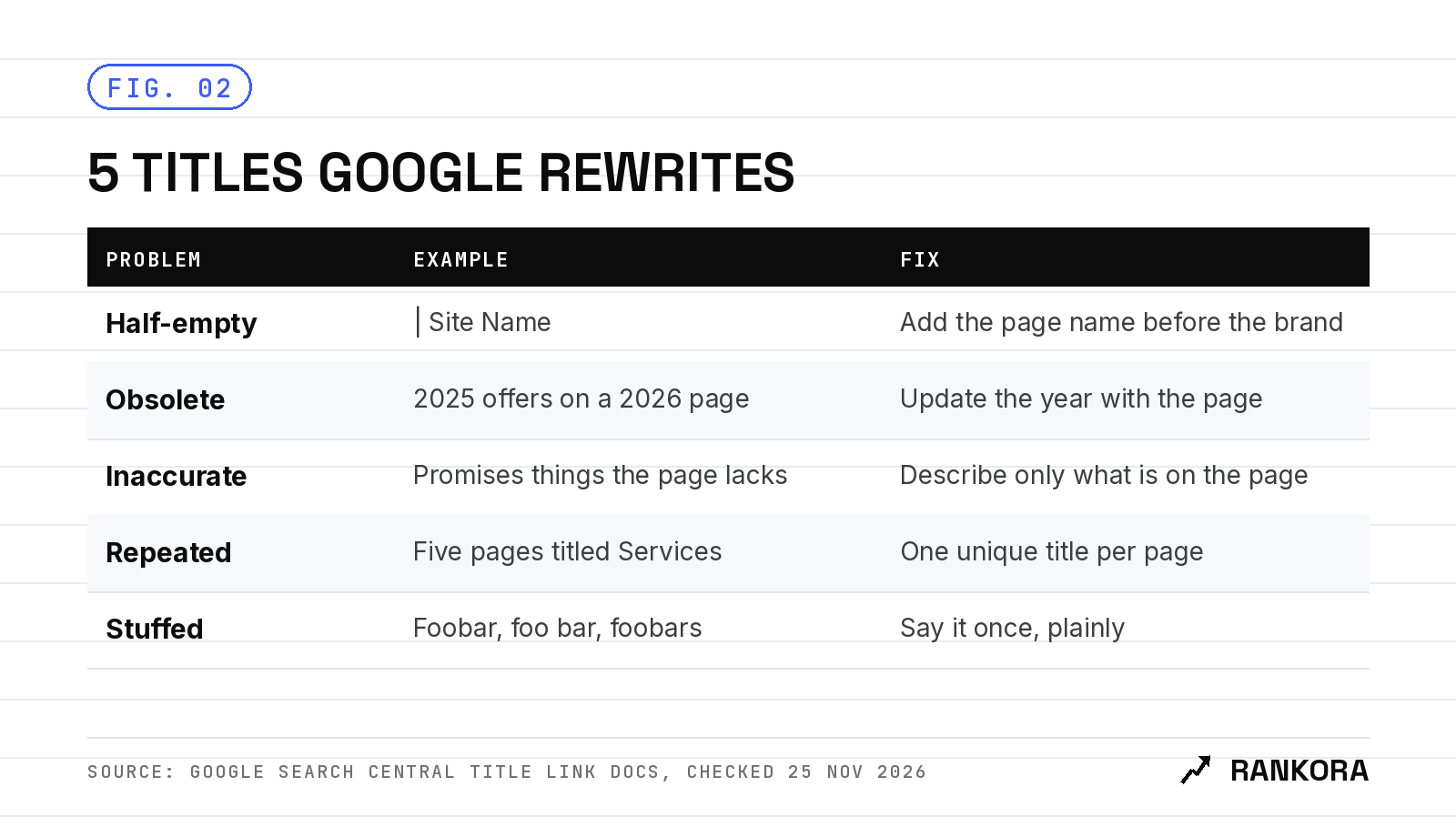
- Half-empty titles. A title like "| Site Name" with the page name missing. Common when a theme field was left blank.
- Obsolete titles. "2025 Diwali offers" on a page that now shows 2026 dates. Google may swap in the date from the visible heading.
- Inaccurate titles. A title promising things the page doesn't cover.
- Repeated titles. Google calls identical titles across pages "micro-boilerplate." Five service pages titled "Services" all look the same in results.
- Keyword stuffing. Google's example, "Foobar, foo bar, foobars, foo bars," "can look spammy." The "Contact Us Contact..." row above is the small business version.
Step 5: Make the H1 agree with the title
When Google drops a title, the H1 is its most likely replacement, so the two should say the same thing in slightly different words. Google's docs ask you to make the main title "visually distinct" and most prominent on the page, for example in the first visible <h1>.
Check two things on each page: there is exactly one H1, and it names the same service as the title. A homepage with three equally large banners and no H1 leaves Google guessing. If you want a second opinion on the rest of the page copy, Rankora's content optimiser is built for on-page work.
Step 6: Write meta descriptions for your top pages
Meta descriptions don't move rankings, but they can shape the click. Google said in 2009 that it doesn't "use the description meta tag in our ranking" in the same post that retired the keywords meta tag. Its snippet documentation says Google mostly builds snippets from page content, and uses the meta description when it gives "a more accurate description of the page."
Expect rewrites. Ahrefs' 2020 study of 20,000 keywords found Google rewrote meta descriptions 62.78% of the time, and staying within length limits barely changed that. So spend 10 minutes, not an hour, per page:
- One or two sentences, unique to the page. Google says "identical or similar descriptions on every page of a site aren't helpful."
- Include the details a searcher checks before calling: area served, opening days, starting price if you publish one.
- There's no official length limit. Around 150 characters keeps the main point visible on most screens.
Step 7: Ask Google to recrawl and check the result
New titles only show after Google recrawls the page. Use the URL Inspection tool in Search Console to request indexing for the pages you changed, starting with the homepage and main service pages. Recrawl timing is up to Google, so check back over the following weeks rather than the following hour.
When the new titles appear, rerun the site: search and update the third column of your sheet. Then watch clicks and click-through rate per page in the Performance report. A title that still gets rewritten is telling you something about the page; recheck it against the five patterns.
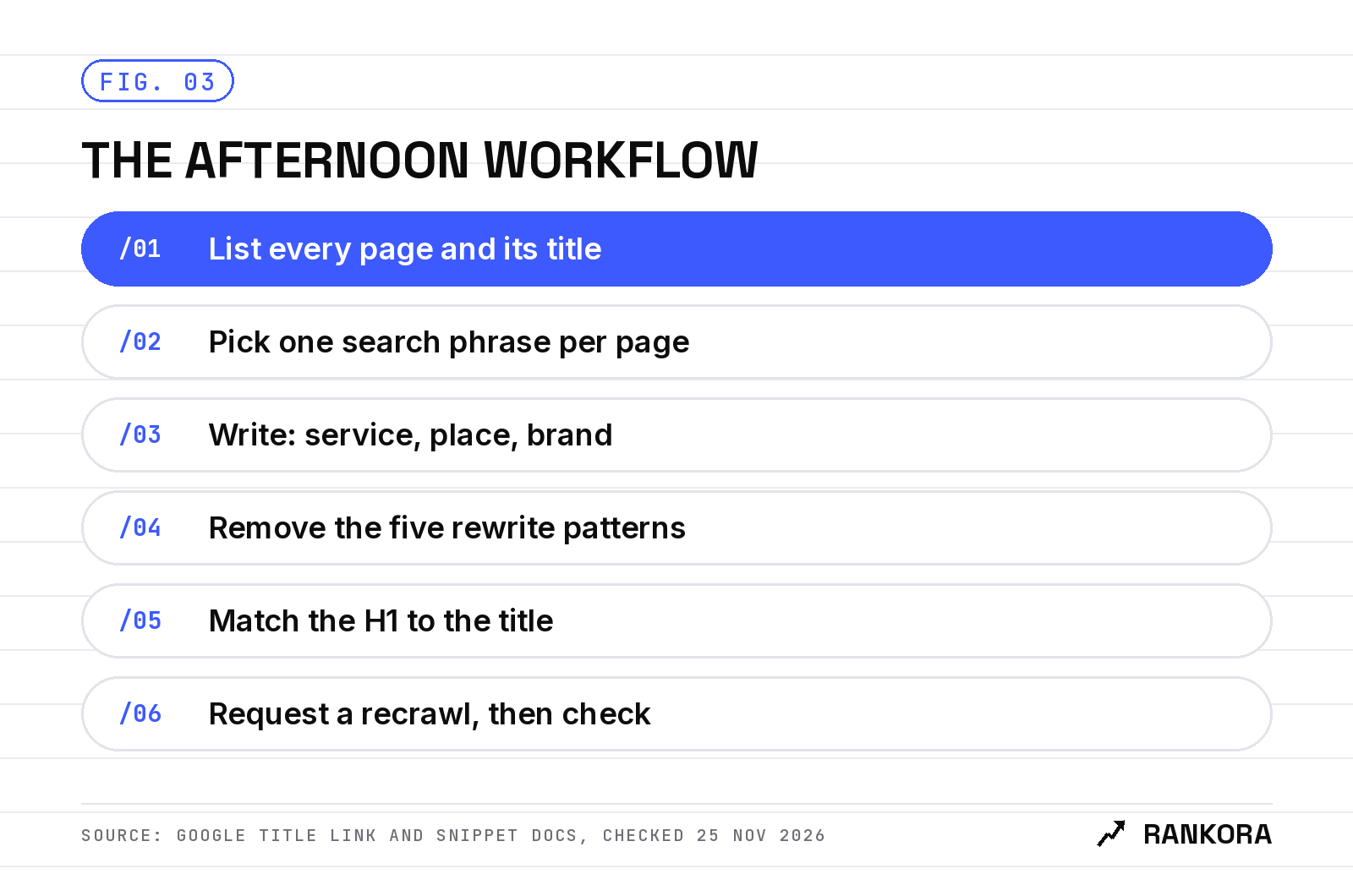
Small business title tags: what to do this afternoon
- Build the three-column sheet: URL, current title, title Google shows.
- Rewrite the homepage title first. "Home" or your business name alone tells a searcher nothing about what you sell.
- Give every service page its own title using service, city and brand.
- Fix any title that hits one of Google's five rewrite patterns, then align each H1.
- Write meta descriptions for your 3 to 5 most visited pages and request indexing for everything you changed.
If you also have a Google Business Profile, keep the business name and category consistent with your homepage title. Our Google Maps ranking fixes explain why the profile and the site should agree, and the small business tool stack under $50 lists the free tools that cover the rest.
FAQ
How long should a title tag be?
Google sets no character limit and truncates title links to fit the device width. A practical target is 50 to 60 characters. Ahrefs found titles wider than 600 pixels were rewritten 46.12% of the time against 33.4% overall, so staying near 60 characters reduces the odds of truncation or a rewrite.
Why does Google change my title tag?
Google rewrites a title when it thinks another source on the page describes it better. Its documentation lists half-empty, obsolete, inaccurate, repeated and keyword-stuffed titles as common triggers. When it swaps, the H1 is the usual replacement, which is why the title and H1 should agree.
Should I put my business name in every title tag?
Yes, briefly. Google recommends branding concisely at the start or end with a delimiter. For a small business that people don't yet search by name, put the service and location first and the name last, so the searcher sees what you offer before who you are.
Do meta descriptions help my site rank?
No. Google stated in 2009 that it doesn't use the description meta tag in ranking. A good description can still earn the click, because Google sometimes shows it as the snippet under your title. Write unique ones for your most important pages and don't worry when Google rewrites them.
Should every page have a different title?
Yes. Google's documentation warns that repeated or boilerplate titles make pages hard to tell apart, and may lead Google to add text of its own. On a 10-page site there's no reason for any two pages to share a title.
How soon will my new titles show in Google?
Only after Google recrawls the page, and Google doesn't publish a fixed timeline. Requesting indexing through the URL Inspection tool asks for a recrawl but doesn't guarantee when it happens. Check your main pages again over the following weeks.
The one thing that matters most
Your homepage title is the line most searchers read before they ever see your site. If it still says "Home," change it today; the other nine pages can follow by this evening.
Tagged